GoX templates
GoX (pinned to v0.3.3) lets you write reactive components as markup in .gox files that compile to checked-in Go. You need the GoX tool only to regenerate that Go, not for ordinary builds.
elem Counter(count *reactive.Signal[int]) {
	<span testid="counter">
		~(nativegox.Text(func() string { return fmt.Sprintf("Count: %d", count.Get()) }))
	</span>
}
Build the generated component through the native printer:
root, err := nativegox.Build(ctx, document, document.Scope(), Counter(count))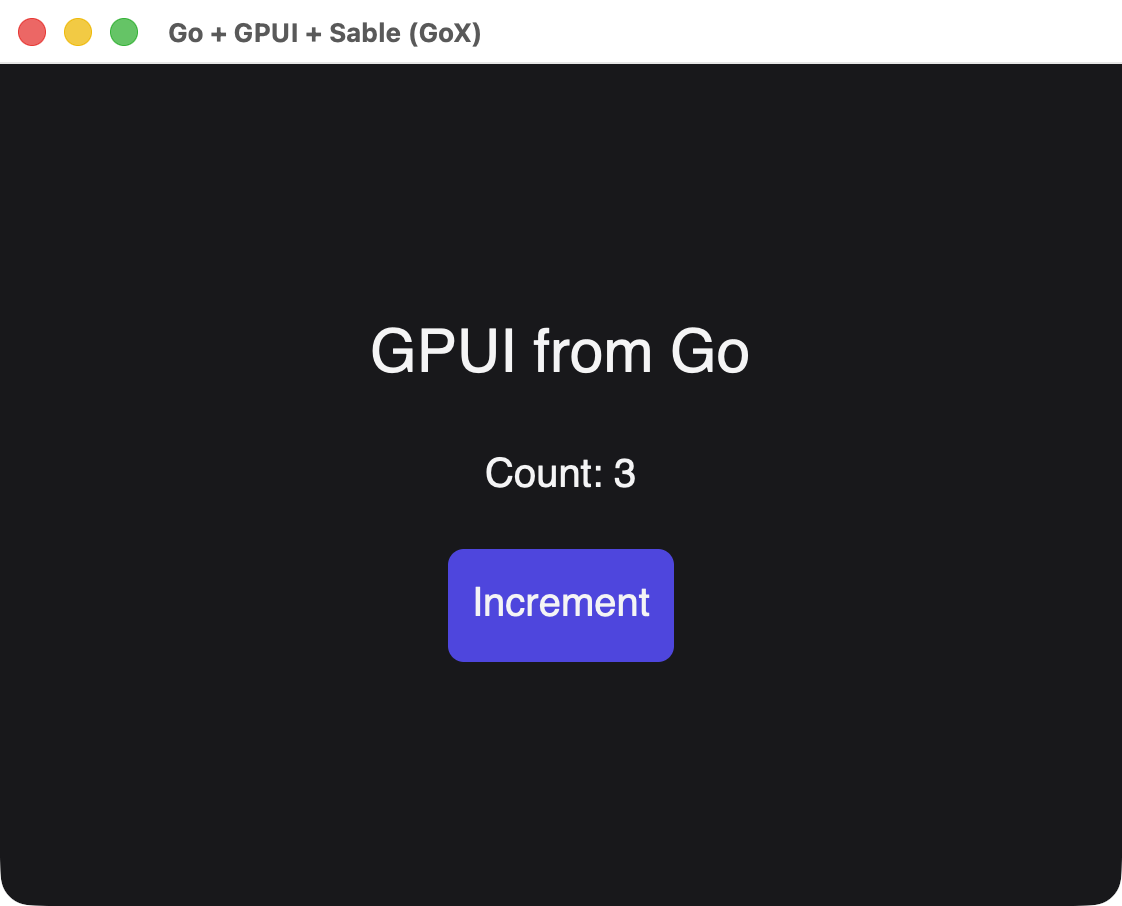
The tags are native GPUI elements rather than HTML. See GoX tags for every tag and attribute. Every screenshot on this page is a real window built from the template shown beside it.
Anatomy of a template
| Syntax | Meaning |
|---|---|
elem Name(args) { ... } | A function returning gox.Elem. Its body runs when Build reaches it |
<div> ... </div> | A native element. It is a Go expression, so you can pass it around |
name="text", name=(expr) | An attribute with a literal or a Go value |
~(expr) | Output as a child: a string, a number, a gox.Elem, a *ui.Node or a nativegox.Text |
~(if ...), ~(for ...) | A condition or loop that runs once, during Build |
<> ... </> | A fragment, which groups children without adding an element |
~~ ... ~~ | Plain Go statements inside a template |
Build runs the component once and requires exactly one root element. After that, only bindings update, so a ~~ ~~ block never runs again.
Reusable components
A component is a function, and its parameters are ordinary typed Go. Output another component with ~( ):
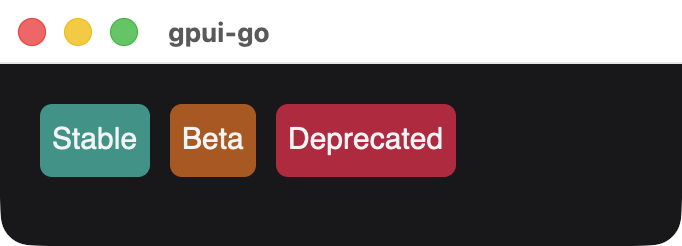
elem Badge(text string, color uint32) {
	<span
		style=(&scene.Style{
			Padding: scene.Padding(6),
			Background: scene.RGB(color),
			CornerRadius: scene.Ptr[float32](6),
		})>
		~(text)
	</span>
}

elem Tags() {
	<div style=(rowStyle)>
		~(Badge("Stable", 0x0d9488))
		~(Badge("Beta", 0xb45309))
		~(Badge("Deprecated", 0xbe123c))
	</div>
}
rowStyle is an ordinary *scene.Style. A .gox file is a Go file, so it can hold declarations like this one, and elements can share a style value:
var rowStyle = &scene.Style{FlexDirection: scene.FlexRow.Enum(), Gap: scene.Pixels(10), AlignItems: scene.AlignCenter.Enum()}Passing children
Take a gox.Elem parameter to accept markup from the caller. A fragment passes several elements as one value:
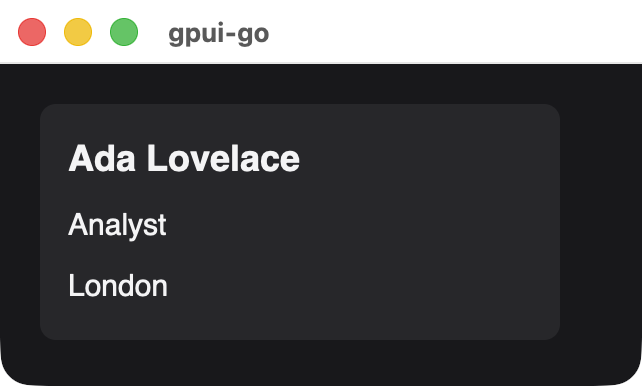
elem Card(title string, body gox.Elem) {
	<div style=(cardStyle)>
		<span style=(titleStyle)>~(title)</span>
		~(body)
	</div>
}

elem Profile() {
	~(Card("Ada Lovelace", <>
		<span>Analyst</span>
		<span>London</span>
	</>))
}
Conditions and loops
~(if ...) and ~(for ...) work with plain Go values:
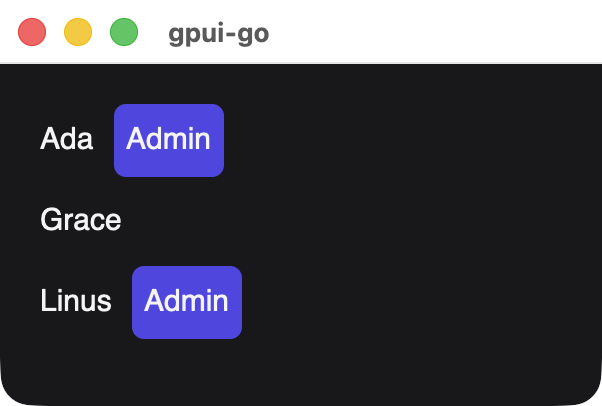
elem Roster(people []Person) {
	<div style=(columnStyle)>
		~(for _, person := range people {
			<div style=(rowStyle)>
				<span>~(person.Name)</span>
				~(if person.Admin {
					~(Badge("Admin", 0x4f46e5))
				})
			</div>
		})
	</div>
}
These run once
Template conditions and loops decide the structure during Build, and they do not rerun when a signal changes. For structure that changes over time, see Changing structure.
Text that changes
Wrap an accessor in nativegox.Text to bind it. Reading a signal directly formats its value once:
elem TextKinds(count *reactive.Signal[int]) {
	<div style=(columnStyle)>
		<span>~(fmt.Sprintf("Formatted once: %d", count.Get()))</span>
		<span>
			~(nativegox.Text(func() string {
				return fmt.Sprintf("Bound to the signal: %d", count.Get())
			}))
		</span>
	</div>
}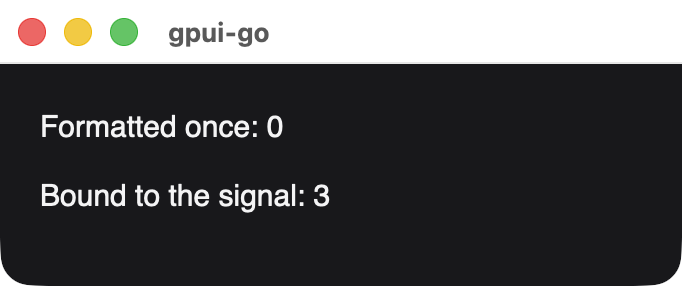
Both lines after setting the signal to 3. Only the bound one updated.
A bare function as a child is an error, which catches a forgotten nativegox.Text.
One text per line
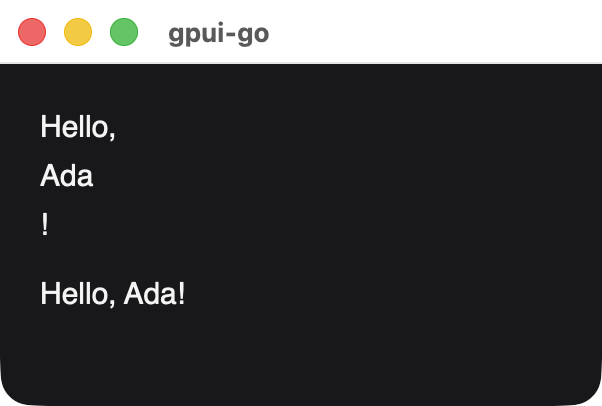
Literal text and each ~( ) become separate text elements, and a span stacks its children because it is a plain container. To get one line, produce one string:
elem MixedText() {
	<div style=(columnStyle)>
		<span>Hello, ~"Ada"!</span>
		<span>~"Hello, Ada!"</span>
	</div>
}
For a line that changes, return the whole string from nativegox.Text.
Text inputs
input is a void tag bound to a string signal, in both directions. Native edits update the signal, and setting the signal replaces the field's text:
elem NameForm(name *reactive.Signal[string], locked *reactive.Signal[bool]) {
	<div style=(columnStyle)>
		<input
			testid="name"
			label="Name"
			value=(name)
			placeholder="Your name"
			disabled=(locked.Get)
			style=(inputStyle)/>
		<span>
			~(nativegox.Text(func() string {
				return "Hello, " + name.Get()
			}))
		</span>
	</div>
}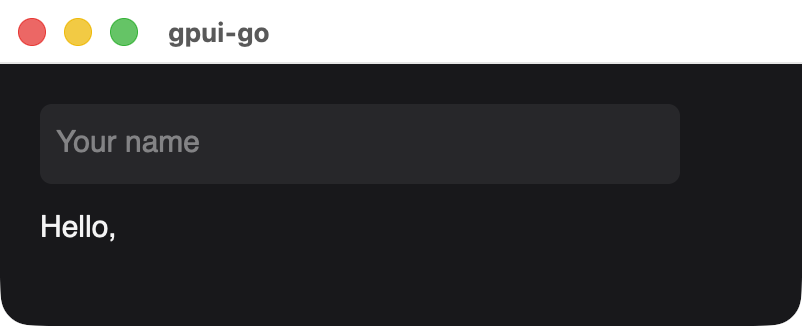
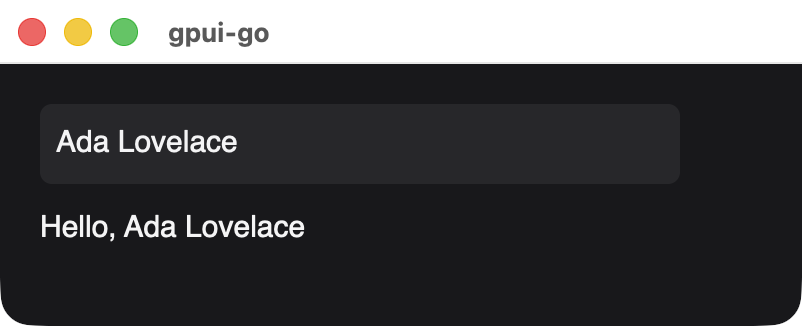
The same window before and after setting the signal from Go.
locked.Get is passed as a method value, so the field re-evaluates it when locked changes. Pass a plain bool for a fixed state. Add a label so that GetByRole can find the field by name.
Events and changing styles
onClick takes a ui.Handler. style and checked also accept accessors, which update just that property when a signal they read changes:
elem Switch(on *reactive.Signal[bool], flip ui.Handler) {
	<button
		label="Notifications"
		role=(scene.RoleCheckbox)
		checked=(on.Get)
		onClick=(flip)
		style=(func() *scene.Style {
			background := scene.RGB(0x3f3f46)
			if on.Get() {
				background = scene.RGB(0x0d9488)
			}
			return &scene.Style{
				Padding: scene.Padding(12),
				Background: background,
				CornerRadius: scene.Ptr[float32](8),
			}
		})>
		~(nativegox.Text(func() string {
			if on.Get() {
				return "Notifications on"
			}
			return "Notifications off"
		}))
	</button>
}flip := ui.Handler(func(context.Context, *client.Event) error {
return on.Update(func(value bool) bool { return !value })
})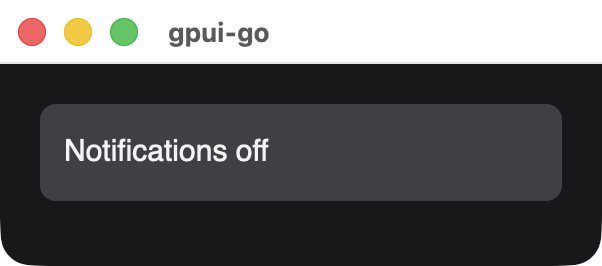
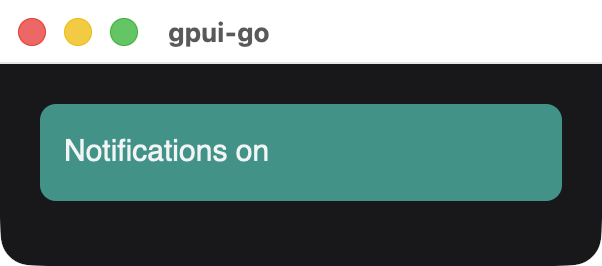
A button is focusable and has the button role, and role replaces that role here. checked is accessibility metadata, so the visible state is up to your style.
Changing structure
Use Show and For for structure that follows signals, and embed the resulting node with ~( ). Each branch or row can be its own template:
elem Board(details, rows *ui.Node) {
	<div style=(columnStyle)>
		~(details)
		~(rows)
	</div>
}

elem Details() {
	~(Badge("Details are open", 0x0d9488))
}

elem TaskRow(task *reactive.Signal[Task], index *reactive.Signal[int]) {
	<span>
		~(nativegox.Text(func() string {
			return fmt.Sprintf("%d. %s", index.Get() + 1, task.Get().Title)
		}))
	</span>
}
Build each piece in the scope the factory receives, so it is disposed with its branch or row:
open := reactive.NewSignal(owner, true)
tasks := reactive.NewSignal(owner, []Task{{1, "Write docs"}, {2, "Take screenshots"}, {3, "Deploy"}})
details := document.Show(owner, open.Get, func(scope *reactive.Scope) *ui.Node {
	return mustBuild(ctx, document, scope, Details())
}, nil)
rows := ui.For(document, owner, tasks.Get,
	func(task Task) int { return task.ID },
	func(scope *reactive.Scope, task *reactive.Signal[Task], index *reactive.Signal[int]) *ui.Node {
		return mustBuild(ctx, document, scope, TaskRow(task, index))
	},
)
root, err := nativegox.Build(ctx, document, owner, Board(details, rows))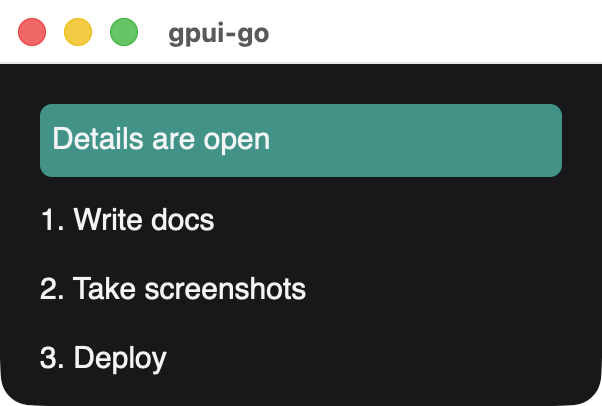
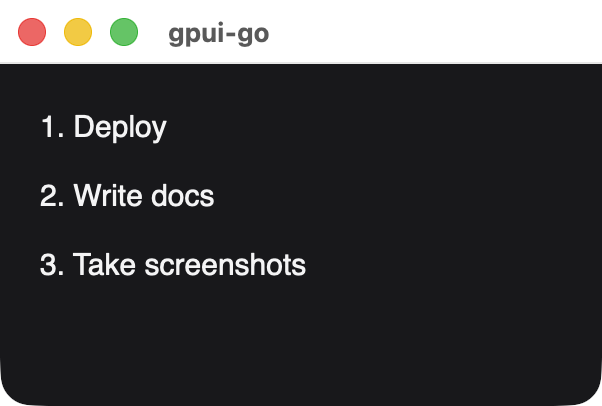
After closing the details and reordering the tasks. The template did not run again, and each row kept its key.
mustBuild panics on failure because factories have no error return. Reactive computations turn that panic into an error and hold back the incomplete snapshot:
func mustBuild(ctx context.Context, document *ui.Document, owner *reactive.Scope, element gox.Elem) *ui.Node {
	node, err := nativegox.Build(ctx, document, owner, element)
	if err != nil {
		panic(err)
	}
	return node
}
Errors
Build reports unsupported markup as an error, prefixed with gox GPUI:.
| Message | Cause |
|---|---|
unsupported native tag "img" | Only div, span, text, button and input exist |
unsupported attribute "class" | The attribute is not in the attribute table |
expected one root, got 2 | The component must produce exactly one root element |
fragment attributes are unsupported | <> takes no attributes |
input must be a void head | Write <input ... />, with no children or closing tag |
input value requires a string signal | value must be a *reactive.Signal[string] |
value/placeholder/disabled/masked require input | Those attributes only apply to input |
wrap reactive text accessors with gox.Text | A bare function was output as a child. Use nativegox.Text |
Generating the Go
Edit the .gox file, and let the generator write the .x.go file beside it. Check that file in, so ordinary builds need no generator:
view.gox     # edit this
view.x.go    # generated, do not edit
generate.go # go:generate directivespackage app
//go:generate gox gen view.gox
//go:generate gofmt -w view.x.goInstall a gox release matching the runtime in your go.mod, because generated files refuse a mismatched version. Format and regenerate with:
gox fmt -no-go view.gox
go generate ./...
Run gox gen after gox fmt, since formatting moves source positions. In a gpui-go checkout, make gox-tools installs the pinned version in bin/gox, and make check-gox-generated confirms that the checked-in Go is current.
For editing, see Vim syntax support. For how the adapter works, see the GoX adapter guide.