Reactive components
If rebuilding the whole tree by hand gets tedious, reactive and ui offer a signal graph in the style of SolidJS. A component is a function that builds its nodes once. Reading a signal inside a binding records a dependency, and when that signal changes, only the affected properties update.
func Counter(document *ui.Document, owner *reactive.Scope, count *reactive.Signal[int]) *ui.Node {
	label := document.BindText(owner, func() string {
		return fmt.Sprintf("Count: %d", count.Get())
	})
	button := document.Div(owner, document.Text(owner, "Increment")).
		Accessible("Increment", &scene.Accessibility{Role: scene.RoleButton}).
		Focusable(0).
		OnClick(func(context.Context, *client.Event) error {
			return count.Update(func(value int) int { return value + 1 })
		}).
		Style(buttonStyle())
	return document.Div(owner, label, button).Style(stackStyle())
}
Create a graph and a document, then mount the component:
graph := reactive.NewGraph()
defer graph.Dispose()
document := ui.New(graph.Root(), app)
owner := document.Scope()

count := reactive.NewSignal(owner, 0)
mount, err := document.OpenWindow(ctx, client.WindowOptions{
	Title: "Reactive counter", Width: 500, Height: 300,
}, Counter(document, owner, count))
if err != nil {
	return err
}
defer mount.Close(context.Background())
return app.DispatchEvents(ctx)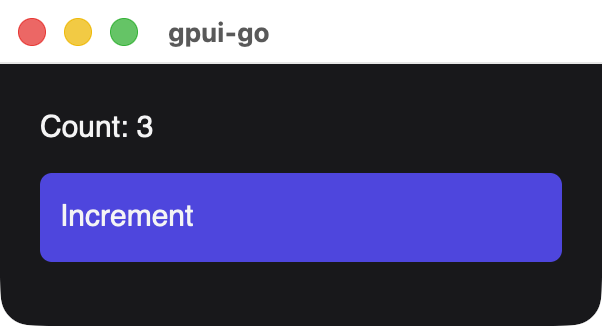
Every screenshot on this page is a real window built by the code shown beside it. stackStyle and buttonStyle are plain functions returning a *scene.Style. See Reactive nodes for every node constructor and method, and GoX templates to write these components as markup.
The pieces
| Piece | Created with | Purpose |
|---|---|---|
| Signal | reactive.NewSignal | A value that bindings can depend on |
| Memo | reactive.NewMemo | A cached value derived from signals |
| Binding | BindText, BindStyle, BindAccessibility | A node property computed from signals |
| Effect | reactive.NewEffect | Runs code outside the UI when signals change |
| Scope | document.Scope(), Scope.Child | Owns all of the above, and cleans them up together |
| Signal method | Description |
|---|---|
Get() | Reads the value and records a dependency when called inside a binding, memo or effect |
Peek() | Reads the value without recording a dependency |
Set(value) | Replaces the value and updates its dependents before returning |
Update(fn) | Sets the value computed from the current one |
Treat values as immutable. Signals compare with reflect.DeepEqual by default, so mutating a slice or map in place can go unnoticed. Pass a new value to Set. To change the comparison, give a typed equality function as the constructor's last argument, or nil to always notify.
Only what changed updates
Each binding depends on exactly the signals it read during its last run:
func TwoLabels(document *ui.Document, owner *reactive.Scope, a, b *reactive.Signal[int]) *ui.Node {
	runsA, runsB := 0, 0
	labelA := document.BindText(owner, func() string {
		runsA++
		return fmt.Sprintf("A is %d (binding runs: %d)", a.Get(), runsA)
	})
	labelB := document.BindText(owner, func() string {
		runsB++
		return fmt.Sprintf("B is %d (binding runs: %d)", b.Get(), runsB)
	})
	return document.Div(owner, labelA, labelB).Style(stackStyle())
}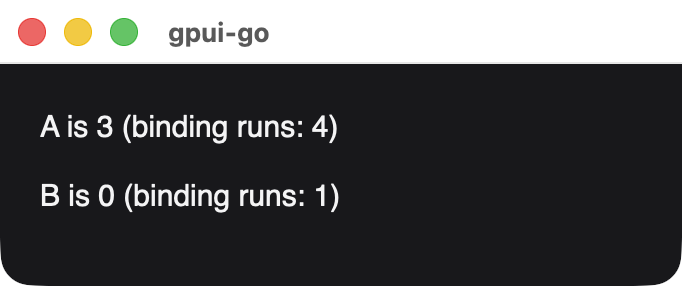
After setting A three times. The binding for B never ran again.
Dependencies are recalculated on every run, so a binding that reads a signal only on one branch of an if stops depending on it when it takes the other branch.
Derived values
A memo caches a calculation, and only notifies its dependents when the result changes:
func ParityLabels(document *ui.Document, owner *reactive.Scope, count *reactive.Signal[int]) *ui.Node {
	parity := reactive.NewMemo(owner, func() string {
		if count.Get()%2 == 0 {
			return "even"
		}
		return "odd"
	})
	countRuns, parityRuns := 0, 0
	countLabel := document.BindText(owner, func() string {
		countRuns++
		return fmt.Sprintf("Count is %d (binding runs: %d)", count.Get(), countRuns)
	})
	parityLabel := document.BindText(owner, func() string {
		parityRuns++
		return fmt.Sprintf("Parity is %s (binding runs: %d)", parity.Get(), parityRuns)
	})
	return document.Div(owner, countLabel, parityLabel).Style(stackStyle())
}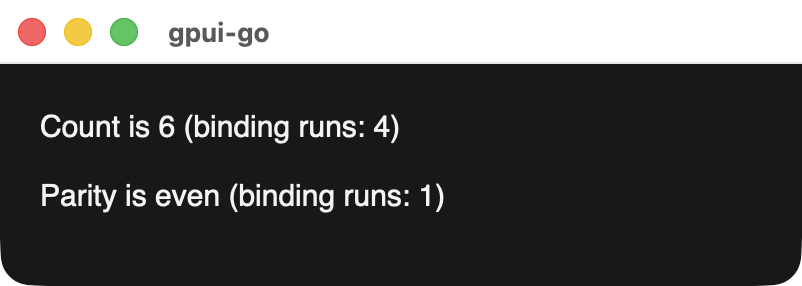
After setting the count to 2, 4 and 6. The parity stayed even, so its label did not run again.
Keep memo calculations pure. Writing a signal inside one returns ErrMemoWrite.
Batching
Outside a batch, every Set updates its dependents immediately. graph.Batch applies several writes first and updates once:
func FullName(document *ui.Document, owner *reactive.Scope, caption string, first, last *reactive.Signal[string]) *ui.Node {
	runs := 0
	return document.BindText(owner, func() string {
		runs++
		return fmt.Sprintf("%s: %s %s (binding runs: %d)", caption, first.Get(), last.Get(), runs)
	})
}

func RenameSeparately(first, last *reactive.Signal[string]) error {
	if err := first.Set("Grace"); err != nil {
		return err
	}
	return last.Set("Hopper")
}

func RenameInBatch(graph *reactive.Graph, first, last *reactive.Signal[string]) error {
	return graph.Batch(func() error {
		if err := first.Set("Grace"); err != nil {
			return err
		}
		return last.Set("Hopper")
	})
}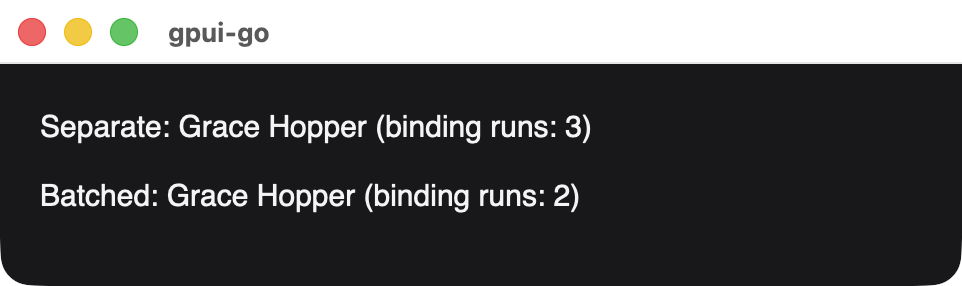
The separate update also published a window showing the half-updated name Grace Lovelace.
Event handlers are batched automatically. Use Batch for updates that start elsewhere. Errors do not roll back writes that have already happened.
Changing styles
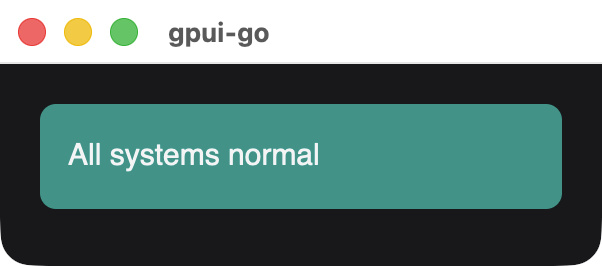
BindStyle recomputes a node's whole style when a signal it reads changes:
func StatusTile(document *ui.Document, owner *reactive.Scope, healthy *reactive.Signal[bool]) *ui.Node {
	text := document.BindText(owner, func() string {
		if healthy.Get() {
			return "All systems normal"
		}
		return "Service degraded"
	})
	return document.Div(owner, text).BindStyle(func() *scene.Style {
		background := scene.RGB(rose)
		if healthy.Get() {
			background = scene.RGB(teal)
		}
		return &scene.Style{Padding: scene.Padding(14), Background: background, CornerRadius: scene.Ptr[float32](8)}
	})
}
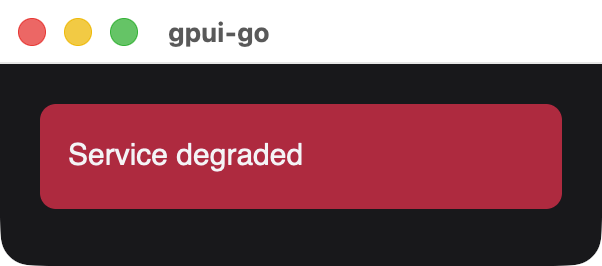
BindAccessibility does the same for accessibility metadata, such as a checkbox's checked state.
Forms
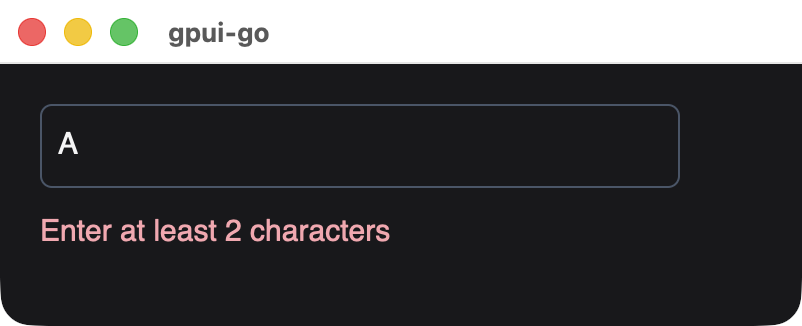
Document.Input binds a native field to a string signal in both directions, so ordinary memos and bindings can validate it as the user types:
func SignupForm(document *ui.Document, owner *reactive.Scope, name *reactive.Signal[string]) *ui.Node {
	valid := reactive.NewMemo(owner, func() bool {
		return len(strings.TrimSpace(name.Get())) >= 2
	})
	field := document.Input(owner, name, ui.InputOptions{Placeholder: "Your name"}).
		Accessible("Name", &scene.Accessibility{Role: scene.RoleTextInput}).
		Style(fieldStyle())
	message := document.BindText(owner, func() string {
		if valid.Get() {
			return "Hello, " + strings.TrimSpace(name.Get())
		}
		return "Enter at least 2 characters"
	}).BindStyle(func() *scene.Style {
		if valid.Get() {
			return &scene.Style{TextColor: scene.RGB(0x5eead4)}
		}
		return &scene.Style{TextColor: scene.RGB(0xfda4af)}
	})
	return document.Div(owner, field, message).Style(stackStyle())
}
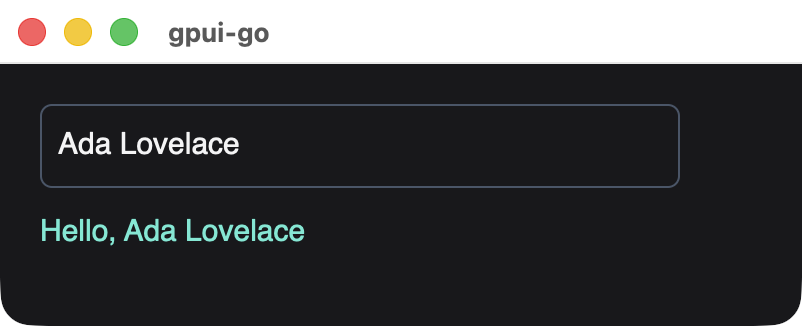
Native focus, selection and IME composition stay with the field while the signal changes. InputOptions.Disabled takes a function, which may read signals.
Conditional content
Document.Show renders one branch and swaps it when the condition changes. The previous branch's scope, nodes and handlers are disposed:
func Disclosure(document *ui.Document, owner *reactive.Scope, open *reactive.Signal[bool]) *ui.Node {
	heading := document.BindText(owner, func() string {
		if open.Get() {
			return "Hide details"
		}
		return "Show details"
	})
	toggle := document.Div(owner, heading).
		Accessible("Details", &scene.Accessibility{Role: scene.RoleButton}).
		Focusable(0).
		OnClick(func(context.Context, *client.Event) error {
			return open.Update(func(value bool) bool { return !value })
		}).
		Style(buttonStyle())
	details := document.Show(owner, open.Get, func(scope *reactive.Scope) *ui.Node {
		scope.OnCleanup(func() {
			// Release anything this branch started.
		})
		return document.Div(scope,
			document.Text(scope, "Signals drive this branch."),
			document.Text(scope, "Closing it disposes these nodes."),
		).Style(stackStyle())
	}, nil)
	return document.Div(owner, toggle, details).Style(stackStyle())
}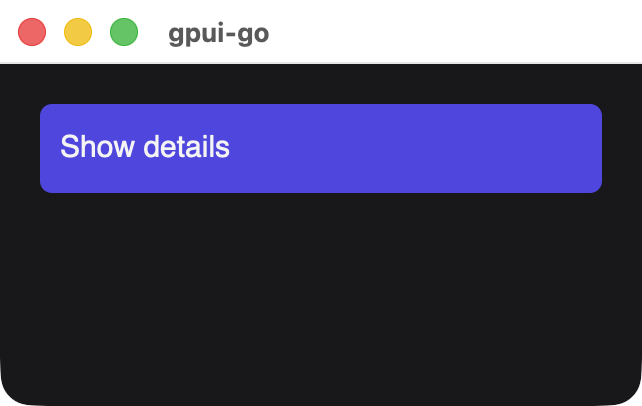
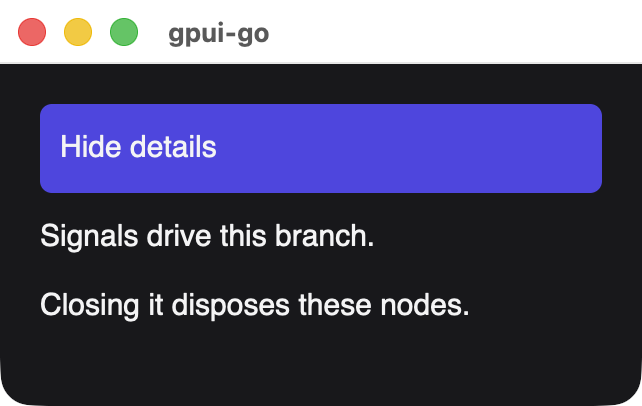
Branch factories run untracked, so put reactive reads inside bindings created in the scope the factory receives. Either factory can be nil to render nothing.
Lists
ui.For keeps one row per key. The render function runs once per new key, and receives signals for the item and its position:
func TodoList(document *ui.Document, owner *reactive.Scope, todos *reactive.Signal[[]Todo]) *ui.Node {
	builds := 0
	rows := ui.For(document, owner, todos.Get,
		func(todo Todo) int { return todo.ID },
		func(scope *reactive.Scope, todo *reactive.Signal[Todo], index *reactive.Signal[int]) *ui.Node {
			builds++
			build := builds
			return document.BindText(scope, func() string {
				mark := " "
				if todo.Get().Done {
					mark = "x"
				}
				return fmt.Sprintf("%d. [%s] %s (built as row %d)", index.Get()+1, mark, todo.Get().Title, build)
			})
		},
	)
	return document.Div(owner, rows).Style(stackStyle())
}

func CompleteTodo(todos *reactive.Signal[[]Todo], id int) error {
	next := slices.Clone(todos.Peek())
	for i := range next {
		if next[i].ID == id {
			next[i].Done = true
		}
	}
	return todos.Set(next)
}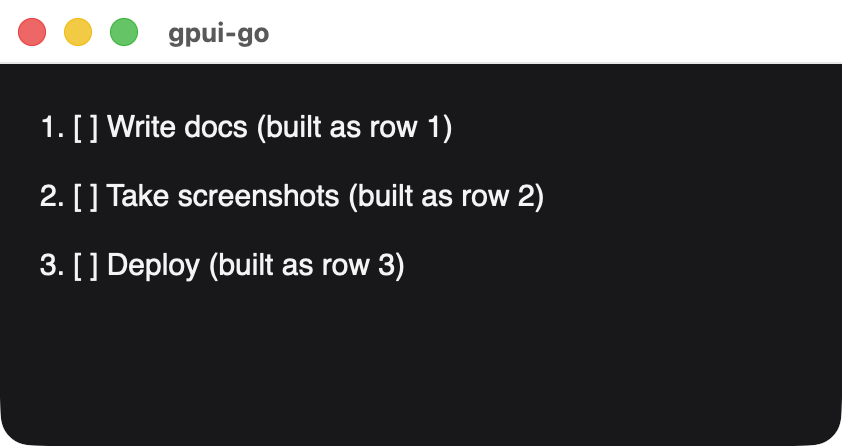
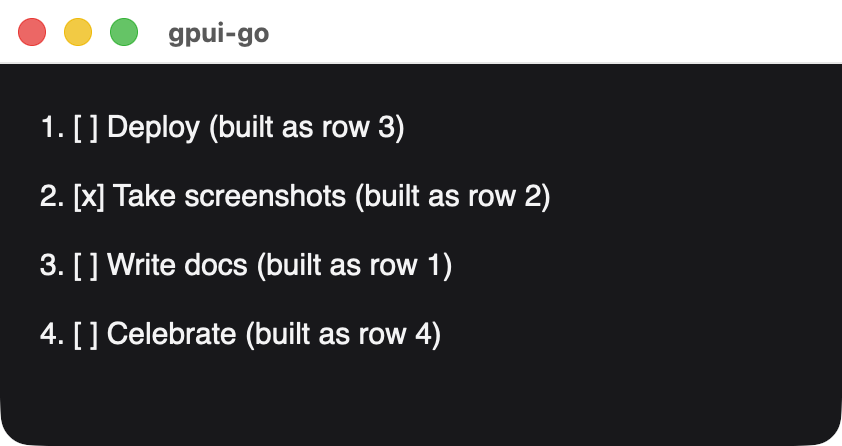
After completing a task, reversing the list and adding a row. Existing rows were updated and moved, not rebuilt, and only the new key was built.
Because rows are retained, a text field inside a row keeps its focus and selection when the list is reordered. Keys must be unique and stay the same for an item's lifetime. Removing a key disposes its row.
Effects
Use an effect for work outside the UI tree, such as a window command:
func SyncTitle(ctx context.Context, owner *reactive.Scope, window *client.Window, unread *reactive.Signal[int]) error {
	_, err := reactive.NewEffect(owner, func(*reactive.Scope) error {
		return window.SetTitle(ctx, fmt.Sprintf("Inbox (%d unread)", unread.Get()))
	})
	return err
}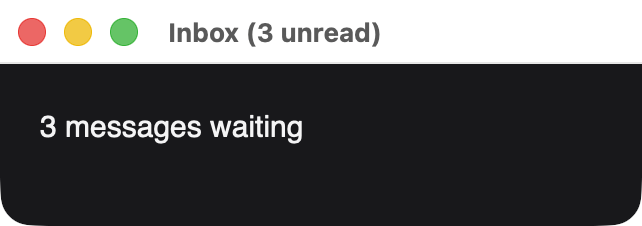
The effect runs immediately and again whenever a signal it read changes. It receives a scope for that run: OnCleanup callbacks registered there run before the next evaluation, so an effect can release what its previous run acquired.
Background work
A graph belongs to one goroutine, so results from other goroutines have to reach it first. Replace DispatchEvents with a loop that receives both:
func RunWithResults(ctx context.Context, app *client.Client, results <-chan int, progress *reactive.Signal[int]) error {
	type received struct {
		events []*client.Event
		err    error
	}
	batches := make(chan received, 1)
	go func() {
		for {
			events, err := app.NextEvents(ctx)
			select {
			case batches <- received{events, err}:
			case <-ctx.Done():
				return
			}
			if err != nil {
				return
			}
		}
	}()
	for {
		select {
		case <-ctx.Done():
			return ctx.Err()
		case value := <-results:
			if err := progress.Set(value); err != nil {
				return err
			}
		case batch := <-batches:
			if batch.err != nil {
				return batch.err
			}
			for _, event := range batch.events {
				if err := app.Dispatch(ctx, event); err != nil {
					return err
				}
			}
		}
	}
}
Errors and limits
- Fluent methods such as
Stylerecord errors. Checkdocument.Err(), which also prevents mounting. - A computation that fails or panics reports an error and holds back new snapshots until it recovers.
- An effect that keeps triggering itself stops with an error after 1,000 runs in one update.
- After mounting, group direct node changes such as
SetChildreningraph.Batch, or callgraph.Flushafterward. Signal updates and event handlers already do this. - Close the
Mountbefore shutting down the client, because disposing a graph does not close its window.
Updates are fine-grained in Go, but the wire still carries complete snapshots, with the usual limits. This is a native node graph, without browser layout or DOM/CSS compatibility. To test these components, see Testing.